

Instead of rewriting your health history at the front desk, ask your dentist for the approved online intake process, complete it before your appointment, and confirm receipt so check-in focuses on updates rather than starting over. Connecting online new patient forms to a faster first visit means linking accurate information to the correct appointment—not simply finishing a screen.
- For an online new patient forms dentist search, prioritize the office-approved form link and confirmation of receipt.
- Dental Arts of Atlantis serves Lake Worth families seeking general, cosmetic, pediatric, and implant dentistry.
- Submitting dental intake paperwork does not book an appointment or confirm that staff reviewed it.
- Prepare medications, allergies, and your main concern before opening patient registration forms.
Why this matters
Dental intake forms give your dentist context: why you are coming, what medicines you take, and what needs extra attention. Completing them beforehand moves information gathering out of the reception area, but it does not replace a conversation or examination.
Dental Arts of Atlantis is best for Lake Worth families seeking general, pediatric, cosmetic, and implant dental care in one practice. Start with Dental Arts of Atlantis to identify the practice, then ask the office which intake method to use.
For a first visit in 2026, keep 3 tasks separate: scheduling the appointment, submitting your forms, and confirming that the office received them. A completed form is not proof that all three happened. This guide follows the patient side of that handoff rather than assuming a particular portal or software connection.
Before you start
Gather your information before opening a form. You do not need to remember every detail perfectly; you do need to identify anything that requires clarification.
- Access: Have your appointment details, a device you can use privately, and the intake link or instructions supplied directly by the office. Use an account only if the approved process requires one.
- Materials: Collect your current medication list, allergies and reactions, relevant health history, previous dentist's details, and dental insurance information if applicable. Parents or guardians should have the child's information ready.
- The easy-to-miss gotcha: Finishing a form does not necessarily submit it. Look for the completion instructions and confirmation, then ask whether the office can locate your submission under the correct patient.
Do not create an account through an unfamiliar message just because it mentions a dental appointment. If anything looks unexpected, verify the request through the practice's contact page before entering health information.
Appointment and intake access
The first configuration task is matching your paperwork to the right person and visit. Use the actual labels on the office-approved form; button names and required fields differ between systems.
- Confirm the appointment. Check the patient's name, appointment date, and reason for visiting against the office's instructions. Ask whether the visit is scheduled or whether you have only sent a request.
- Request the approved intake route. Ask whether you should complete an online form, use a patient account, or follow another process. Do not assume the practice offers a particular portal.
- Check patient identity. Enter identifying information exactly as requested. For a child, distinguish the patient's details from the parent or guardian's contact information.
- Confirm access needs. Tell the office before the visit if you need help reading forms, using a device, communicating, or completing paperwork on someone else's behalf.
Expected result: You know which appointment the forms belong to and which submission method the office wants you to use. You also know whom to contact if the link fails.
A useful question is whether the office needs the forms before a particular deadline. Follow that answer rather than applying a generic internet recommendation about when to arrive.
Health history and visit priorities
Accurate dental intake information matters more than finishing quickly. For your 2026 appointment, review your current information rather than copying an old list without checking it.
- Prepare your medication list. Include prescription medicines, over-the-counter medicines, and supplements. Record names and doses from your current labels; flag anything you cannot verify rather than guessing.
- Describe allergies clearly. Identify the substance and what happened after exposure. A reaction description gives the dental team more useful information than an unexplained allergy entry.
- Complete the health history. Answer the questions presented and identify relevant conditions, procedures, or changes. If you do not understand a question, ask the office instead of selecting an answer merely to continue.
- State the main concern. Describe the location, symptoms, when they began, and what makes them better or worse. Add worries about treatment, sensory needs, or difficulty sitting comfortably.
- Review administrative details. Check contact information and any requested insurance details. Use the method the office specifies for sending documents or card images.
Expected result: Your forms describe your current health and the reason for your visit, with uncertain items clearly marked for discussion.
Keep a separate 1-page summary for yourself if your history is complicated. This is a personal reference, not a replacement for the requested forms. Never stop or change prescribed medication to prepare for dental care unless your prescribing clinician directs you.
Submission and receipt checks
Submission connects your preparation to the office's intake process. Use this sequence: Review details, Submit forms, Check receipt, and Report changes.
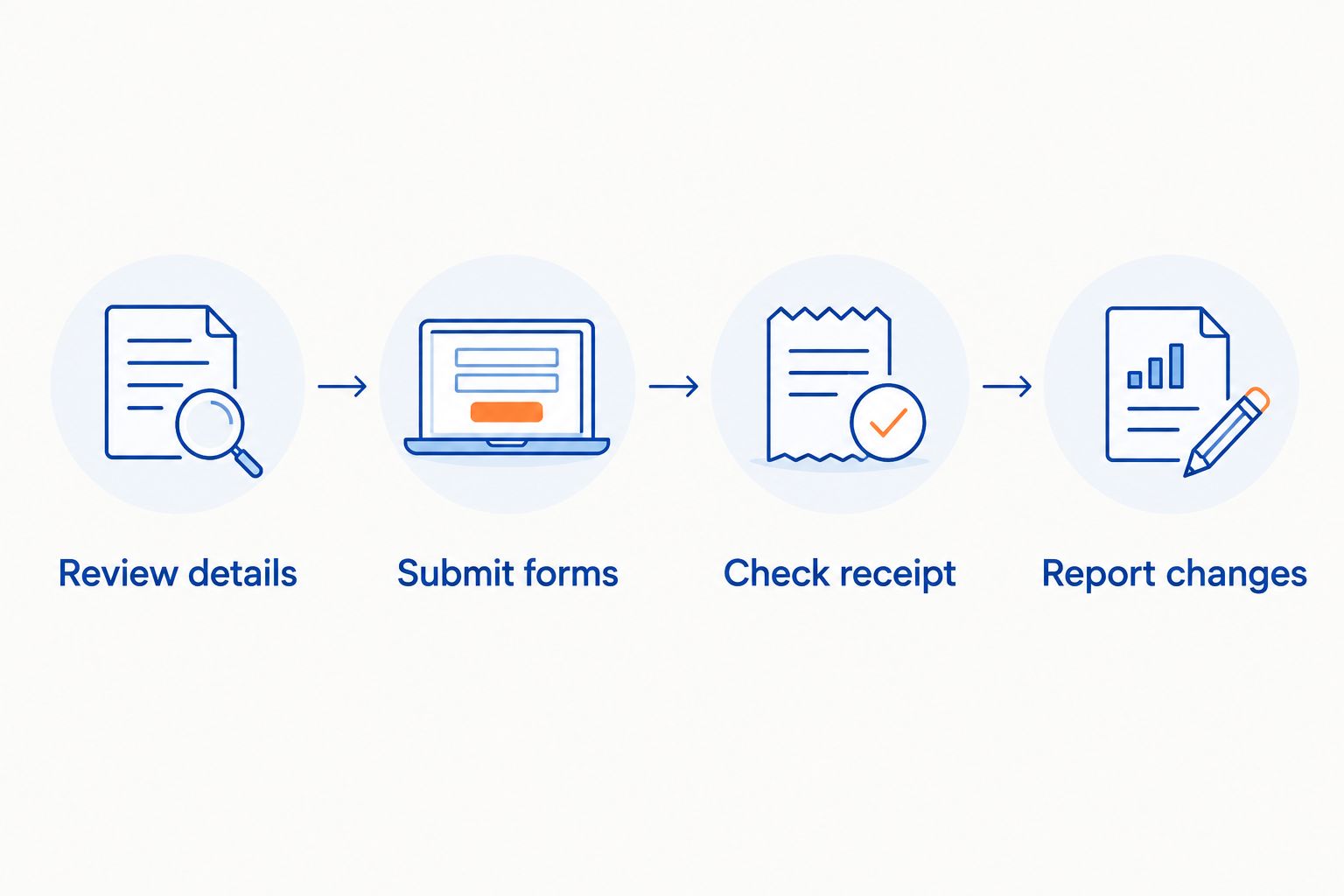
- Review details. Check names, birth date, medication entries, unanswered questions, and requested signatures. Read acknowledgments before accepting them; ask about anything you do not understand.
- Submit forms. Follow the form's final submission instructions. Do not assume that moving to the last page, saving a draft, or closing the browser sends your answers.
- Check receipt. Note any confirmation provided by the system. If no clear confirmation appears, ask the office to verify receipt before you repeat the submission.
- Report changes. Tell the office if your symptoms, medications, allergies, or contact details change after submission. Ask how to provide corrections without creating conflicting versions.
Expected result: You have evidence of submission and know whether the office can locate the paperwork. Receipt and clinical review remain separate: ask directly if an important concern needs attention before the appointment.
Avoid sending a screenshot of the entire completed health history through ordinary messaging just to prove you finished. Describe the submission problem and ask for an approved way to resolve it.
Arrival and clinical handoff
The final connection happens at check-in. Your goal is to confirm what is already there, identify changes, and make your main concern easy to find.
- Follow the office's arrival instructions. Online paperwork does not cancel any request to arrive early or bring identification and other requested materials.
- Confirm paperwork status. Ask whether anything is missing. If the office requests another form, clarify whether it covers a different purpose or replaces an earlier version.
- Give a brief update. Mention new symptoms, medication changes, or corrections immediately. Do not assume a recently submitted update has already reached everyone involved in your care.
- State your priority to the clinical team. Explain the main reason for your visit and any comfort concern, even if both appear in the paperwork.
Expected result: The front desk can identify remaining administrative tasks, and the clinical team hears your current concern directly.
Use 2 final checks: confirm that the paperwork is attached to the correct patient, then confirm that important changes have been communicated. A faster check-in should never mean skipping questions about your health.
Update forms whenever your information changes
Returning patients need a shorter version of the same workflow. If you completed intake earlier in 2026, review what has changed rather than assuming the original answers remain accurate.
Ask the office which update process to use. Report changes to medications, allergies, health conditions, contact information, and the reason for the appointment. If nothing has changed, say so through the method requested.
These preparation routes serve different needs:
| Preparation route | Best for | Advantage | Limitation |
|---|---|---|---|
| Office-approved online forms | Patients comfortable entering information digitally | Lets you consult records before arriving | Completion still needs submission and receipt checks |
| Office-assisted paperwork | Patients needing help with access or questions | Lets you clarify unclear requests with staff | Requires coordination; ask when help can be provided |
| Returning-patient updates | Patients whose existing history needs correction | Focuses attention on changed information | Old entries still need review for accuracy |
None of these routes replaces an examination. Choose the process the office supports and that you can complete accurately.
Troubleshooting common intake problems
The form link will not open
Verify that you are using the link supplied by the office. Try an updated browser or another private device, then contact the office if the problem continues. Ask for an alternative process rather than searching for an unofficial copy.
Your progress disappears
Some forms require a separate save action or do not retain unfinished entries. Check the instructions before restarting, keep your source information nearby, and ask whether the office received a partial or complete submission. Avoid entering the same history repeatedly without checking status.
A required question does not fit your situation
Do not invent an answer to pass a required field. Use an explanation field if provided, or ask the office how to document the issue. An uncertain medication dose or unclear medical term deserves clarification.
The office cannot find your forms
Check the patient name, birth date, submission date, and any confirmation reference. For family appointments, confirm that each person's information went under the correct patient. Ask whether a new submission is needed before creating a duplicate.
Your health changes after submission
Contact the office and explain the change. New symptoms or an important health update need direct communication, not just an edited field. For trouble breathing or swallowing, seek emergency medical help immediately rather than waiting for a form response.
Customize your workflow for your family
For a household scheduling dental care in 2026, keep each person's medication list, concerns, and paperwork status separate. Shared contact information should not lead to shared clinical answers. A parent's health history does not belong in a child's record.
For a nervous patient, add a short comfort note: explain what worries you and what helps you communicate. You can ask about breaks, explanations before treatment, or support with forms without assuming a particular accommodation has been arranged.
For someone changing dentists, ask how previous records should be transferred. A request for records and the actual arrival of records are different events; confirm what the new office has received.
Dental Arts of Atlantis provides family dental care in Lake Worth. When preparing for that visit, ask which information the office wants in advance and which questions should be discussed directly. Do not send your full medical history through an unverified channel to save a step.
FAQ
How do I find online new patient forms for my dentist?
Ask your dental office for its approved intake link or instructions. Verify unexpected messages before entering personal or health information, and do not assume every practice uses an online portal.
Does submitting dental forms online book my first appointment?
Submitting dental forms does not by itself confirm an appointment. Confirm the appointment separately and ask whether the office can locate your paperwork under the correct patient.
Will online dental forms make my first visit shorter?
Online forms move paperwork preparation before the visit, but they do not guarantee a shorter appointment. Your dentist still needs to review your history, discuss concerns, and determine the appropriate examination and care.
What information should I gather before filling out dental forms?
Gather your medication list, allergies and reactions, relevant health history, and main dental concern. Have appointment details and any requested insurance information ready, and identify uncertain answers rather than guessing.
Can I complete dental intake forms for my child?
Ask the office who should complete and sign your child’s paperwork. Enter the child’s clinical information separately from the parent or guardian’s contact details, and confirm any authorization requirements.
What should I do if I cannot complete the online forms?
Contact the office and ask for an alternative or assistance. Explain whether the obstacle is technical access, language, reading, or an unclear question so the office can advise you.
Should I fill out the forms again if I never got confirmation?
Check with the office before submitting another copy. Provide the patient details and approximate submission time so staff can look for the original and avoid conflicting versions.
Do I still need to discuss my medications at the appointment?
Yes, confirm your current medications and any changes with the dental team. A submitted list supports the conversation but does not replace checking that the information is accurate.
One last thing
Before your 2026 first visit, write 1 sentence describing what you most want the dentist to understand. Keep it specific: identify your main concern and what you hope to discuss, without trying to diagnose yourself.
That sentence helps connect the paperwork to the person sitting in the chair. At Dental Arts of Atlantis, bring it into the conversation even if you already entered it online.
Related guides
- How to prepare for your first visit as a new patient
- How to switch dentists without losing your treatment plan
- How to manage dental anxiety before a procedure