
Instead of manually scrolling through Apple Watch or Fitbit sleep charts at your appointment, prepare a dated sleep summary and symptom log so your clinician can assess the concern. Wearable data supports a sleep apnea evaluation; it does not replace a medical sleep study or establish a diagnosis.
- Apple Watch sleep data sleep apnea evaluation starts with dated charts, symptoms, and a clinician—not a sleep score.
- Fitbit sleep tracking adds context but cannot diagnose or rule out obstructive sleep apnea.
- Dental Arts of Atlantis fits Palm Beach County families seeking dental sleep apnea treatment after medical evaluation.
- Bring device details and relevant alerts; do not delay care while collecting more nights.
Why this matters
A sleep chart answers a different question from a sleep study. Your watch estimates sleep patterns; a diagnostic study measures signals used to identify breathing events during sleep. A reassuring score does not explain away gasping, witnessed breathing pauses, or persistent daytime sleepiness.
For your 2026 evaluation, treat wearable records as supporting information—not a pass-or-fail test. Start with your symptoms. If you are unsure which symptoms deserve attention, review how to know if your snoring means sleep apnea.
Dental Arts of Atlantis is best for Palm Beach County families seeking dental sleep apnea treatment, not a watch-based diagnosis. A medical evaluation establishes whether sleep apnea is present; a dental assessment addresses whether an oral appliance fits your treatment needs.
Before you start
- Have your device and account access ready. Bring your paired phone, access to Apple Health or the Fitbit app, and enough battery power to open the records. Use only your own account or records you have permission to share.
- Prepare your clinical context. List symptoms, medications, existing sleep diagnoses, previous sleep studies, and any prescribed treatment. Include a bed partner’s observations when available.
- Check the non-obvious gotcha: features differ. Apple Watch sleep tracking is not the same as sleep apnea notifications. Fitbit measurements also depend on the device and enabled features. A missing alert or metric is not a negative medical test.
You do not need a complete export before requesting an appointment. Contact a clinician promptly for witnessed breathing pauses, repeated nighttime gasping, or significant daytime sleepiness. Do not drive when sleepy. Severe breathing difficulty while awake or chest pain requires emergency medical attention, not a wearable review.
Apple Watch sleep records
The Apple Watch workflow starts on the paired iPhone. Use the records already available; do not activate a feature and assume it will immediately produce a useful history.
- Open the Health app. In versions with a Browse tab, select Browse, then Sleep. If your layout differs, locate the Sleep category in Health rather than following an outdated screen location.
- Open a recent sleep chart. Review its dates, recorded sleep duration, and available stages. Capture the date range with the chart so the clinician knows which nights it represents.
- Open individual nights that match a symptom you remember. Note whether you woke gasping, had a morning headache, or felt unusually sleepy the next day. Keep observations separate from the watch’s measurements.
- Check whether your supported device has recorded breathing disturbances or issued a sleep apnea notification. If present, preserve the original wording and any report offered within Health. Do not rename an elevated breathing-disturbance result as diagnosed apnea.
- Check the Watch app’s Sleep settings if overnight records are absent. Confirm Track Sleep with Apple Watch is enabled when that setting is available, and follow the device’s sleep-tracking instructions.
Expected result: You have dated sleep charts, relevant symptoms, and any original breathing-related notification—not a self-assigned diagnosis.
For a 2026 appointment, record your watch model and software version alongside the screenshots. This lets the clinician distinguish ordinary sleep tracking from a device-specific screening feature without guessing from the appearance of a chart.
Apple’s sleep apnea notification feature is intended to identify patterns associated with possible sleep apnea on supported devices. It is not a diagnostic test, and an absence of notifications does not rule out the condition.
Fitbit sleep records
The Fitbit workflow collects sleep history and available measurements without treating a sleep score as a breathing assessment. You do not need to compare your score with someone else’s.
- Open the Fitbit app and sync your device using the app’s current controls. Confirm that the most recent recorded sleep appears before taking screenshots.
- In app versions that display a Today tab and Sleep tile, open Today, then Sleep. If the layout has changed, locate your sleep history using the current app navigation.
- Capture a recent overview and relevant individual nights. Include the dates and units shown on screen. Keep estimated sleep stages labeled as estimates.
- Record oxygen-related or breathing-rate information only if your device and app actually display it. Preserve the metric’s exact name; do not turn an oxygen-variation chart into an oxygen-saturation percentage.
- Add context for incomplete records: the device was charging, you removed it, your sleep schedule changed, or you forgot to wear it. Mark an unrecorded night as missing rather than interpreting it as normal sleep.
Expected result: You have synchronized, dated Fitbit records with a clear distinction between measured or estimated metrics and your own observations.
When preparing Fitbit records in 2026, include the device model and app version. Feature names and layouts change; the clinician needs to know what the chart actually represents.
Which record helps with which question?
Neither wearable wins as a diagnostic substitute. Use the device you already wear consistently, then let your clinician choose the appropriate medical assessment.
| Record source | Best for | Useful contribution | Limitation |
|---|---|---|---|
| Apple Watch with Apple Health | Existing Apple Watch users organizing sleep history | Dated sleep estimates and, on supported devices, breathing-related screening information | Feature availability varies; records do not establish or exclude sleep apnea |
| Fitbit with the Fitbit app | Existing Fitbit users documenting sleep patterns | Sleep history and device-dependent overnight metrics | A sleep score is not an apnea measurement; available metrics differ |
| Clinician-directed sleep study | Patients who need diagnostic assessment | Physiological recordings interpreted in the context of symptoms and medical history | Requires clinical selection and interpretation; home testing is not appropriate for every patient |
Keep wearable comparisons secondary to symptoms. A clinician does not need matching Apple Watch and Fitbit scores to evaluate your concern.
Visit packet
A useful packet makes the clinical question obvious. Aim for a 1-page summary, supported by selected screenshots rather than an album of every recorded night.
- Choose a consistent date range. If records are available, use 7 nights as a practical starting point for organizing your packet—not a diagnostic requirement. Do not postpone an appointment to complete that range.
- Select 2 screenshots to start: an overview and a night linked to a symptom. Add the original notification or report if you received one. These are suggested presentation limits, not medical thresholds.
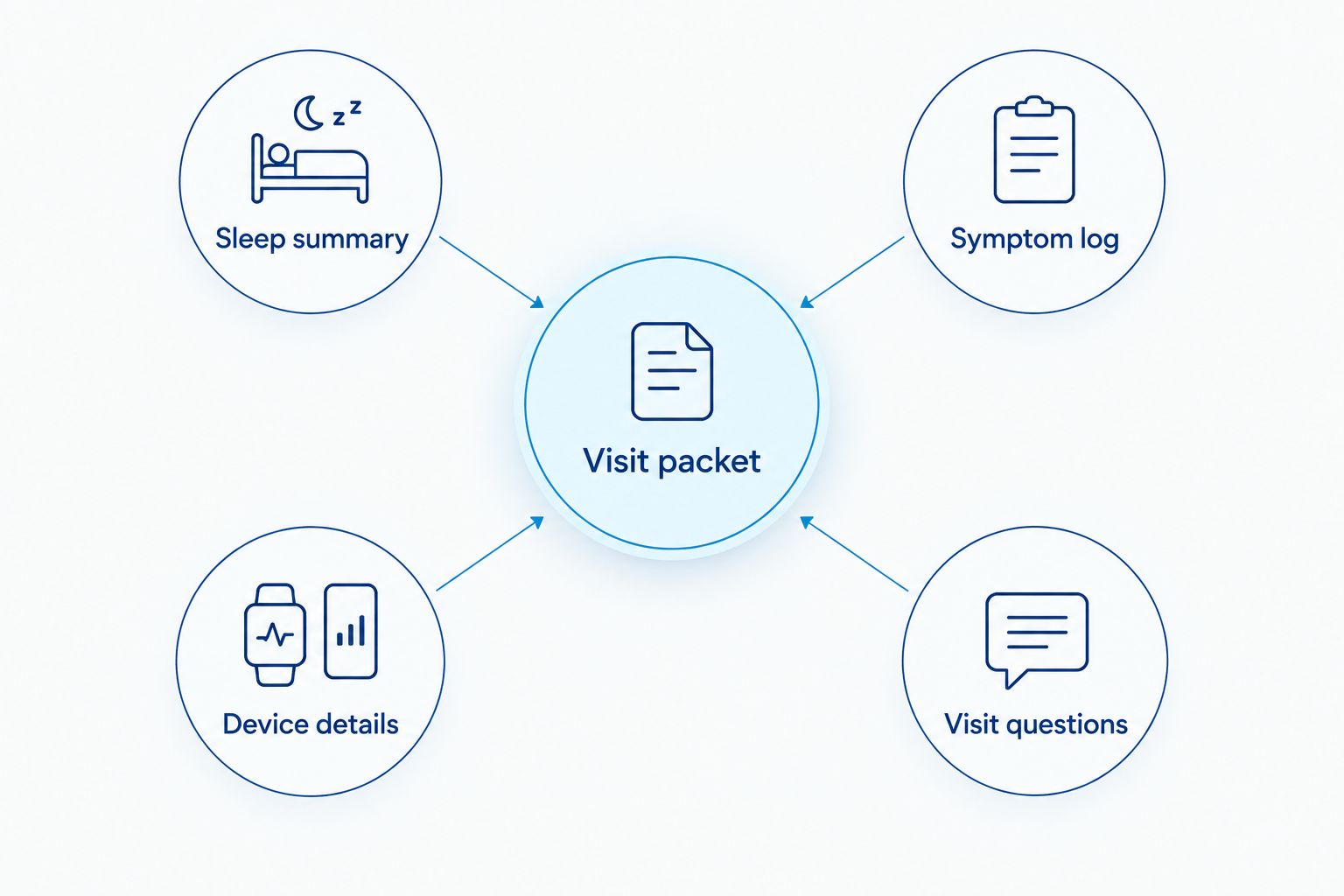
- Create the following sections: Sleep summary, Symptom log, Device details, and Visit questions. Put your main concern at the top.
- Keep the original images readable. Leave visible dates, units, and chart labels; remove unrelated personal information before sharing outside your care team.
- Save a copy you can open without internet access. Ask the receiving office which secure submission method it accepts before sending health records.
Expected result: Your clinician can see why you requested the visit, what the device recorded, and where the records are incomplete.
Use these headings for the contents of your visit packet:
- Sleep summary: Date range, estimated sleep duration, relevant charts, and any original alert.
- Symptom log: Snoring, witnessed pauses, gasping, morning headaches, and daytime sleepiness, with dates when possible.
- Device details: Device model, software version, tracking settings, and missing nights.
- Visit questions: Whether diagnostic testing is needed, which clinician coordinates care, and what treatment follow-up involves.
Record sleep duration in hours, breathing rate in breaths per minute, and oxygen saturation in percent only when the original display uses those units. Never supply missing values yourself. A blank field is more accurate than a converted guess.
Clinical handoff
The handoff turns your records into a clear request for care. It is not an automatic integration between a wearable account and a dental office.
- Tell your primary care clinician or sleep clinician what prompted the concern. Lead with symptoms, then mention the wearable record or notification.
- Ask whether you need a home sleep apnea test or an in-laboratory sleep study. The clinician selects testing based on your history and medical needs, not your preferred device.
- If testing occurs, keep the interpreted report and follow-up recommendations. A wearable screenshot does not replace that report.
- If oral appliance therapy becomes part of the discussion, bring the medical findings, current treatment information, and dental concerns to your dental appointment.
- Ask how treatment effectiveness will be checked. Less snoring or a better watch score alone does not confirm that sleep apnea is adequately controlled.
Expected result: You know who is assessing the diagnosis, who is discussing treatment, and which records each clinician needs.
Dental Arts of Atlantis offers sleep apnea treatment in Lake Worth for Palm Beach County families. Its dental role does not make Apple Watch or Fitbit data diagnostic. Ask how the dental treatment plan will coordinate with your medical sleep care.
For the next stage, read how to connect a home sleep study to oral appliance therapy.
When new sleep data or an alert appears
The adjacent workflow is an update to an existing packet, not a new diagnosis each morning. Use it when symptoms change, a notification appears, or your clinician requests follow-up records.
Save the new dated chart or original alert, add the associated symptoms, and note changes in medication, illness, sleep schedule, or prescribed treatment. Send the update only through the channel your clinician has approved.
For ongoing tracking in 2026, preserve your original baseline rather than overwriting it. Keep pre-treatment and treatment-period records separate, and follow the clinician’s instructions about repeat testing.
Do not stop CPAP, adjust prescribed treatment, or reposition an oral appliance because a wearable score improves or worsens. Contact the treating clinician about concerns. Wearable trends support the conversation; they do not authorize treatment changes.
Troubleshooting
The device did not record sleep
Sync the device, check the battery and sleep-tracking settings, and confirm that you wore it according to the manufacturer’s instructions. Mark the gap in your packet. Missing data does not mean breathing was normal.
The chart looks reassuring, but symptoms persist
Request clinical evaluation based on the symptoms. Consumer sleep estimates and screening notifications cannot exclude sleep apnea. Do not wait for the device to agree with witnessed breathing pauses or significant sleepiness.
Apple Watch and Fitbit disagree
Keep each record labeled by device and date. Different sensors and algorithms produce different estimates; do not average the scores or select whichever looks better. Bring the discrepancy as context, not evidence that either device has diagnosed you.
The office cannot open the export
Ask which format and secure submission method the office accepts. Bring your phone and readable screenshots as a backup. Do not assume Dental Arts of Atlantis has a direct connection to Apple Health or Fitbit.
You have a low oxygen reading without context
Preserve the original display and discuss repeated concerning readings with a clinician. Consumer readings can be affected by fit and measurement conditions. If you have severe breathing difficulty, chest pain, or other acute symptoms, seek urgent medical help rather than troubleshooting the watch.
Customize your workflow
Tailor the packet to the question you need answered. Shift workers should include actual sleep times; patients using prescribed therapy should identify which nights involved treatment. A bed partner’s dated observations add information the watch cannot supply.
If you already use CPAP, bring the prescribed treatment information and any clinician-requested machine reports. If you are considering an oral appliance, include dental concerns such as jaw pain, loose teeth, or an existing night guard.
For your 2026 care plan, keep diagnostic evidence, treatment records, and wearable trends in separate sections. A grinding guard is not interchangeable with a prescribed sleep apnea appliance. Dental Arts of Atlantis can discuss dental sleep apnea treatment; the suitability of an appliance requires an individual assessment.
FAQ
Can Apple Watch sleep data diagnose sleep apnea?
Apple Watch sleep data cannot diagnose sleep apnea. Supported screening features can prompt medical evaluation, but diagnosis requires clinician-directed assessment and appropriate testing.
Can Fitbit rule out sleep apnea if my sleep score is good?
A good Fitbit sleep score cannot rule out sleep apnea. Seek evaluation for witnessed breathing pauses, nighttime gasping, or persistent daytime sleepiness even when your score looks reassuring.
What should I bring to a sleep apnea evaluation in 2026?
Bring dated wearable records, a symptom log, device details, and any previous sleep study or treatment report. Keep original alerts and visible chart units so your clinician can interpret the records correctly.
Is Apple Watch better than Fitbit for a sleep apnea evaluation?
Neither Apple Watch nor Fitbit replaces diagnostic sleep testing. Use the device you already have, document its available features, and prioritize symptoms over comparisons between scores.
Do I need to wait for several nights of data before making an appointment?
You do not need to wait for a complete wearable history before requesting an evaluation. Witnessed breathing pauses, repeated gasping, or significant daytime sleepiness justify contacting a clinician promptly.
Can a dentist help after a sleep apnea diagnosis?
A dentist can assess whether oral appliance therapy fits a medically established sleep apnea treatment plan. Dental Arts of Atlantis offers sleep apnea treatment, while medical testing and follow-up remain essential to coordinated care.
Can I use my watch to decide whether an oral appliance is working?
Your watch alone cannot confirm that an oral appliance adequately controls sleep apnea. Follow the treating clinicians’ plan for symptom review, appliance assessment, and objective follow-up testing.
One last thing
Save the ordinary nights, not just the alarming one. A dated overview helps your clinician understand whether a concerning chart was isolated, repeated, or surrounded by missing records. Keep it beside your symptom log, and let the clinical assessment—not the most dramatic screenshot—determine the next step.
Related guides
- Finding a dentist who treats sleep apnea in Palm Beach County
- Oral appliances for CPAP-intolerant sleep apnea patients
- Connecting CPAP compliance data to an oral appliance switch